The N+1 Query Problem: Kill It Before It Kills Your App
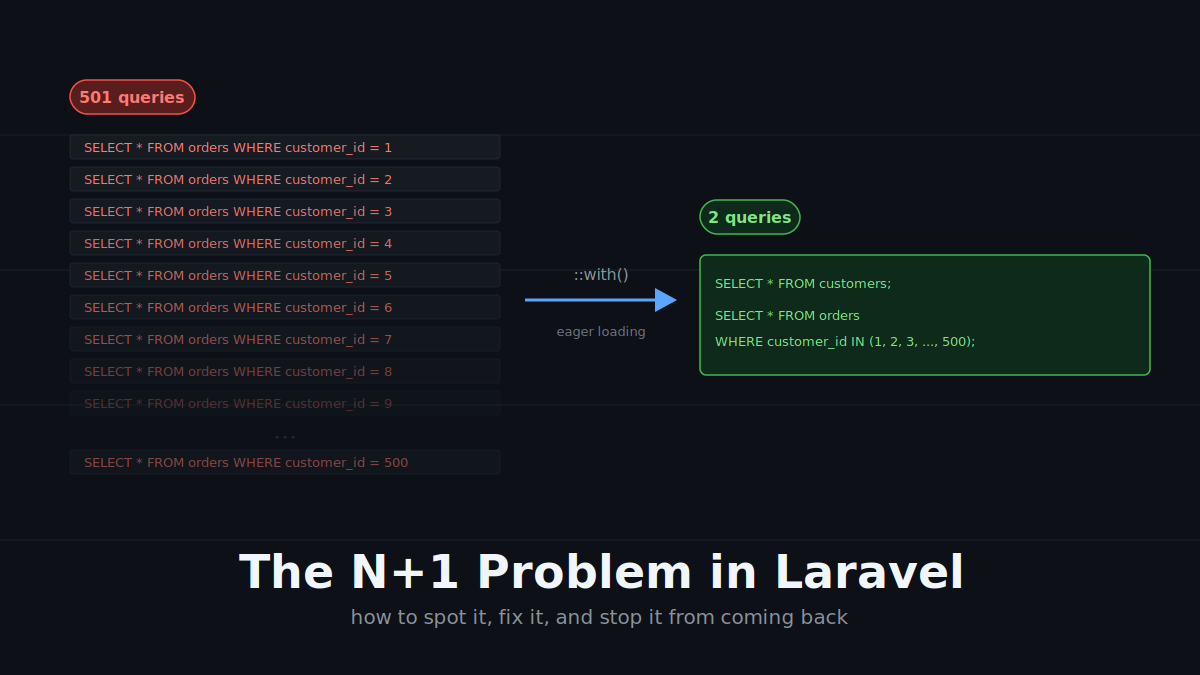
Eager loading collapses a flood of per-record queries into a single batched query.
TL;DR: The N+1 problem is what makes a “fast-looking” Eloquent controller silently melt your database. Diagnose it with Telescope or the query log, fix it with
with(), and lock the door behind you withModel::preventLazyLoading()so it never comes back.
The dashboard that looked fast in dev
You ship a customer dashboard. It’s beautiful. Twelve customers in your seed data, the page loads in 90 ms, you push to production.
Six months later, the same page lists 800 customers and takes nine seconds to render. The server is fine. The query that lists customers takes 4 ms. So why is the page on fire?
You open the slow query log and see this, repeating hundreds of times:
select * from "orders" where "orders"."customer_id" = 1 and "orders"."customer_id" is not null
select * from "orders" where "orders"."customer_id" = 2 and "orders"."customer_id" is not null
select * from "orders" where "orders"."customer_id" = 3 and "orders"."customer_id" is not null
...
Welcome to the N+1 query problem — the most common, most preventable performance disaster in any ORM-based application. This post is a deep dive into what it is, why Eloquent makes it so easy to fall into, how to fix it properly, and — more importantly — how to make sure it never quietly creeps back into your codebase.
What the N+1 problem actually is
The N+1 problem happens when you load a collection of N records, and then for each record you execute one additional query to fetch related data. You started with one query for the collection, you ended up with N+1 queries total. Hence the name.
Consider a classic one-to-many setup:
customers          orders
---------          --------
id (PK)    ─────►  id (PK)
name               customer_id (FK)
email              description
                   total
You want to render a dashboard listing every customer along with their orders. Naively, in Eloquent:
$customers = Customer::all();

foreach ($customers as $customer) {
    foreach ($customer->orders as $order) {
        echo $order->description;
    }
}
That $customer->orders access — every single iteration — fires a fresh SELECT * FROM orders WHERE customer_id = ?. With 500 customers, that is 1 query for the customers table plus 500 queries for orders. 501 queries. The number in the title is not a metaphor; it is the literal count Laravel Telescope would log.
Why it hurts more than the math suggests
Here is the trap: in development, with 5 seeded customers, your dashboard takes 25 ms. Six queries. Nobody notices.
In production, the cost is not just the queries themselves — it is the network round trip for each one. Every query to your database carries:
- TCP connection overhead (or connection-pool checkout)
- SQL parsing on the server
- Query plan lookup
- Result serialization back to PHP
- Eloquent hydrating each row into a model
Even on a same-region database with 1 ms of latency, 500 round trips is a 500 ms floor before any actual work happens. Add a dependent dashboard widget that does its own N+1 nested inside the first one — $customer->orders[0]->products — and you are suddenly looking at thousands of queries and a page that legitimately cannot render in under five seconds.
This is why N+1 is the single highest-leverage bug to find and kill in any Laravel codebase. A four-line change can take a page from 6 seconds to 80 ms.
How to spot it
The pattern is almost always the same: a database access inside a loop.
Sometimes the loop is obvious — a foreach. Sometimes it is hidden in a ->map(), a ->filter(), an API Resource transformation, or a Blade @foreach that touches $customer->orders for each row.
// Innocent-looking. Disastrous in production.
public function index()
{
    $customers = Customer::all();

    return $customers->filter(function ($customer) {
        return $customer->orders->count() > 0;   // N+1 lives here
    });
}
Three tools will make this visible:
1. Laravel Telescope. Install it in local and check the Queries tab after hitting any endpoint. If you see “Queries (501), 499 of which are duplicated”, you have your answer.
2. Laravel Debugbar. In-page query counter. Lightweight, instant feedback as you click around.
3. The raw query log. No package needed, just instrumentation:
DB::enableQueryLog();
// ... run your code ...
dd(DB::getQueryLog());
A heuristic worth internalising: if your query count grows with the size of your data, you have an N+1 somewhere. Constant query count regardless of result set size = healthy. Linear growth = bug.
The fix: eager loading
Eager loading tells Eloquent to fetch the related models up front, in a second batched query, alongside the main one. Instead of 501 queries you get 2:
select * from "customers";
select * from "orders" where "customer_id" in (1, 2, 3, ..., 500);
In Eloquent that is a one-word change:
// Before — N+1
$customers = Customer::all();

// After — eager loaded
$customers = Customer::with('orders')->get();
That is it. Laravel’s ORM hydrates the orders into each customer’s orders relation property, so any later $customer->orders access is served from memory — zero additional queries.
The full controller fix:
namespace AppHttpControllers;

use AppModelsCustomer;

class CustomerDashboardController extends Controller
{
    public function index()
    {
        $customers = Customer::with('orders')
            ->get()
            ->filter(fn ($customer) => $customer->orders->isNotEmpty());

        return response(['result' => $customers]);
    }
}
Two queries, regardless of whether you have 5 customers or 50,000.
Eager loading is not just with() — the variants worth knowing
Customer::with('orders') is the 80% case, but a senior Laravel developer reaches for the right variant for the right job.
Nested eager loading
Need orders and the products on each order? Dot notation:
$customers = Customer::with('orders.products')->get();This produces three queries: customers, orders, products. The math is 1 + depth, not 1 + N + N².
Constrained eager loading
You do not always want all the related rows — maybe just paid orders, or the most recent five:
$customers = Customer::with([
    'orders' => fn ($query) => $query
        ->where('status', 'paid')
        ->latest()
        ->limit(5),
])->get();
The constraint is applied to the batched query, not as a per-customer filter. Performant and correct.
Lazy eager loading (load())
Sometimes you only know you need the relation after the parent collection is already in memory — for example, after a permission check filters the set down:
$customers = Customer::all();
$customers = $customers->filter(fn ($c) => $user->can('view', $c));
$customers->load('orders');   // single batched query, AFTER filtering
This is the right tool when conditional logic decides whether the relation is needed at all.
Counting without loading
Often you only need the count of related records, not the records themselves. withCount() does this in a single subquery:
$customers = Customer::withCount('orders')->get();

// Now: $customer->orders_count works without loading any orders.
For a dashboard that displays “Jane Doe — 12 orders”, this is dramatically cheaper than with('orders') followed by ->count().
Locking the door: making N+1 impossible to commit
This is where most articles stop. The senior move is realising that knowing the fix is not enough — you also need a guard rail, because new team members and tired Friday-afternoon-you will inevitably write Customer::all() followed by a relationship access in a loop. Laravel ships two guards for exactly this. Use them both.
preventLazyLoading() — fail loudly in dev
Available since Laravel 8.43. Drop this in AppServiceProvider::boot():
use IlluminateDatabaseEloquentModel;

public function boot(): void
{
    Model::preventLazyLoading(! $this->app->isProduction());
}
Now any code path that triggers a lazy relationship load throws a LazyLoadingViolationException:
Attempted to lazy load [orders] on model [AppModelsCustomer] but lazy loading is disabled.
Your CI test suite will scream the moment a regression slips in. The ! isProduction() guard means production stays graceful — better a slow page than a broken one for end users — while dev and staging treat lazy loading as a hard error.
automaticallyEagerLoadRelationships() — Laravel 12.9+
A newer escape hatch. When enabled, Eloquent detects relationship accesses on a collection and automatically eager loads them on the fly:
public function boot(): void
{
    Model::automaticallyEagerLoadRelationships();
}
I have mixed feelings about this one. It is genuinely useful for established codebases where you cannot audit every endpoint, and it is a beautiful fallback safety net. But I treat it as a belt-and-braces measure, not a primary strategy — relying on auto-eager-loading means your code still expresses an N+1 even if the runtime patches it. Pair it with preventLazyLoading() in development so you write explicit with() calls, and let automaticallyEagerLoadRelationships() catch the ones that slip through in production.
When eager loading is the wrong answer
A nuance that took me a few production incidents to fully internalise: with() is not always the right fix. Sometimes the real problem is that you are loading data you do not need at all.
A few patterns worth being honest about:
You only need a count. Use withCount(), not with().
You only need to know if any related records exist. Use withExists() (Laravel 9+) or has() in the where clause.
You are rendering a paginated list. Eager loading plus pagination is fine, but be aware that with('orders') will pull all orders for every paginated row — if customers have thousands of orders each, you have traded an N+1 for a single ten-megabyte query. Constrain or paginate the relation itself.
You are processing a million-row export. Do not load it all into memory at all. Use chunk(), chunkById(), or lazy() — they batch eager-loaded relationships per chunk, keeping memory flat:
Customer::with('orders')->lazy(500)->each(function ($customer) {
    // process one customer at a time, but orders are batched in chunks of 500
});
The senior framing: eager loading is a tool to fix the round-trip count. When the bottleneck is data volume rather than round trips, you need a different tool entirely.
Wrapping up
The N+1 problem is a rite of passage for every Laravel developer. The fix is technically a one-word change — with() — but the real fix is cultural and structural:
- See it. Run Telescope or Debugbar locally on every feature you build.
- Fix it. Reach for the right variant —
with,load,withCount,withExists, or chunking — based on what the data actually needs to do. - Prevent it.
Model::preventLazyLoading(! app()->isProduction())belongs in every new Laravel project’sAppServiceProvider. Treat lazy loading as a compile-time error you just happen to discover at runtime.
A four-line guard rail today saves a four-figure database bill next quarter. That is the kind of trade an experienced backend developer makes without thinking — and it is what separates an Eloquent dabbler from someone who has shipped Laravel at scale.




1 comment